 By admin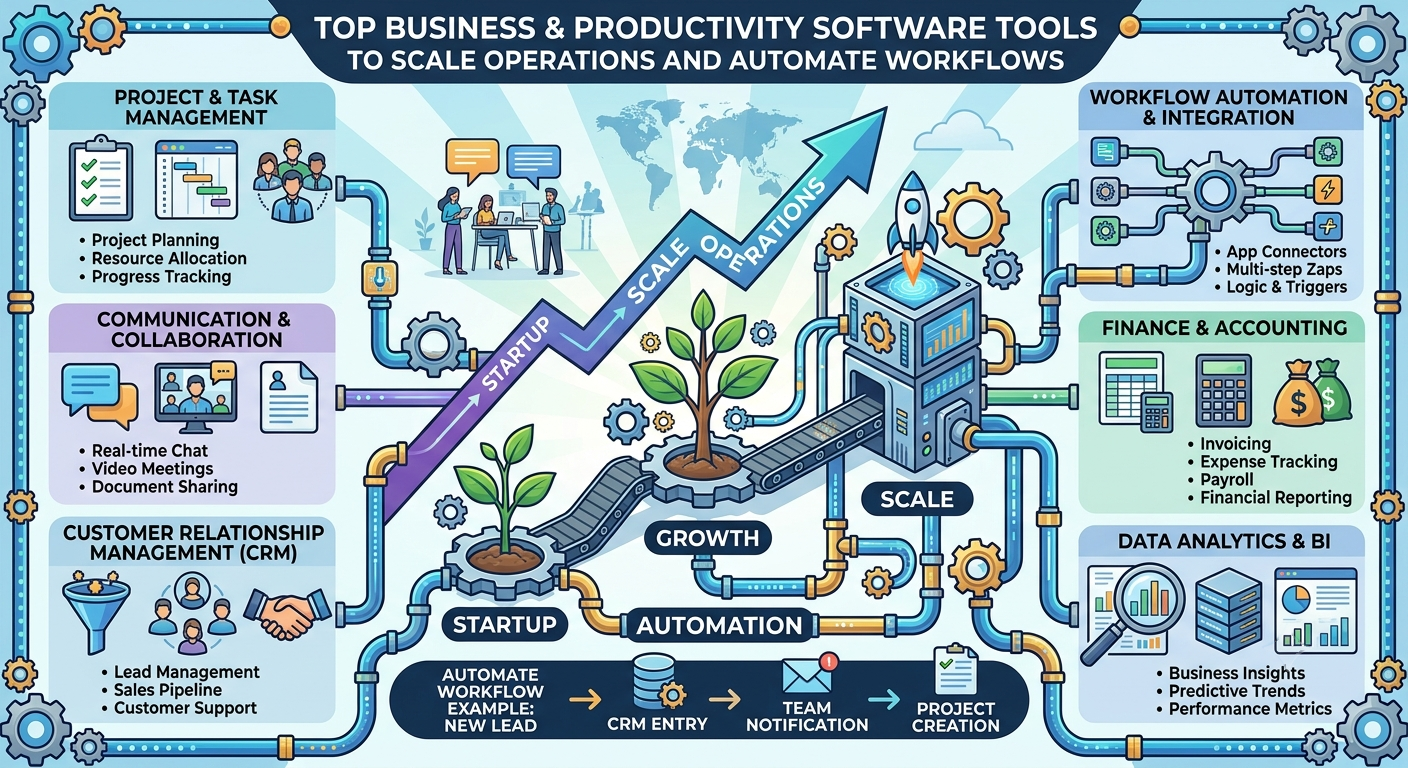
Modern organizations rely on specialized software tools to maintain agility, manage remote teams, and optimize daily operations. Selecting the right software stack helps eliminate administrative bottlenecks, improve collaboration, and drive sustainable operational efficiency.
1. Core Software Categories for Scaling Businesses
To build a streamlined technology stack, evaluate software solutions across four core operational pillars:
                  ┌─────────────────────────────────────────┐
                  │      Enterprise Software Ecosystem      │
                  └────────────────────┬────────────────────┘
                                       │
      ┌─────────────────┬──────────────┴───┬─────────────────┐
      ▼                 ▼                  ▼                 ▼
┌───────────┐     ┌───────────┐      ┌───────────┐     ┌───────────┐
│ Project   │     │ Customer  │      │ Financial │     │ Workflow  │
│ Mgmt      │     │ Rel (CRM) │      │ & Acct    │     │ Automate  │
└───────────┘     └───────────┘      └───────────┘     └───────────┘
2. Project Management and Collaboration Tools
Project management platforms provide clear visibility into task ownership, project timelines, and team resource allocation.
Asana & Trello
- Best For: Task management and team activity tracking.
- Key Features: Kanban board views, timeline/Gantt charts, task dependencies, workload management.
- Why Use It: Replaces unstructured email chains with centralized task assignment and transparent progress updates.
Notion & ClickUp
- Best For: All-in-one workspace organization, knowledge management, and task integration.
- Key Features: Custom database views, internal wiki documentation, embedded docs, automated task workflows.
- Why Use It: Centralizes team documentation, standard operating procedures (SOPs), and project execution into a single platform.
3. Customer Relationship Management (CRM) Systems
CRM systems track customer interactions, manage sales pipelines, and improve client retention rates.
Prospective Lead ──► Automated Capture ──► Lead Scoring ──► CRM Pipeline ──► Conversion
HubSpot CRM
- Best For: Growing businesses requiring integrated marketing, sales, and service functionality.
- Key Features: Automated contact tracking, pipeline management, email tracking, integrated live chat.
- Strengths: Offers a rich free tier with seamless upgrade paths for scaling teams.
Salesforce Sales Cloud
- Best For: Mid-market and large enterprises needing customizable sales architectures.
- Key Features: Advanced reporting analytics, AI-driven lead scoring, deep third-party integrations.
- Strengths: Highly customizable for complex sales operations and large team structures.
4. Financial Accounting and Invoicing Software
Automating accounting reduces manual data entry errors, simplifies tax compliance, and maintains real-time cash flow visibility.
QuickBooks Online & Xero
- Best For: Small to mid-sized businesses and freelancers.
- Key Features: Bank feeds reconciliation, automated recurring invoicing, expense receipt tracking, real-time balance sheet generation.
- Benefits: Simplifies tax prep, tracks accounts receivable, and flags unpaid invoices automatically.
5. Workflow Automation Infrastructure
Automation bridges the gaps between separate software platforms, eliminating repetitive manual data entry.
Zapier & Make (Integromat)
- Function: Connects independent applications through trigger-and-action logic without requiring code.
- Example Use Case: Automatically save incoming email attachments to cloud storage, trigger a CRM lead entry, and notify the team via Slack.
- ROI Impact: Saves hundreds of operational hours per month by automating routine manual processes.
6. Software Selection Framework
When selecting new software tools for your organization, follow this evaluation protocol:
- Audit Functional Needs: Identify existing workflow bottlenecks before purchasing new tools.
- Prioritize Integration: Choose software that connects seamlessly via native integrations or open APIs.
- Evaluate Security Standards: Ensure platforms comply with essential data standards (SOC2, GDPR, end-to-end encryption).
- Calculate Total Cost of Ownership (TCO): Factor in recurring user license fees, onboarding costs, and administrative maintenance overhead.
Frequently Asked Questions (FAQs)
Q1: What is the difference between SaaS and custom-developed software?
SaaS (Software-as-a-Service) is cloud-hosted software paid via regular subscriptions. It offers instant deployment, regular updates, and minimal upfront costs. Custom software is built specifically for your business processes, requiring significant capital and ongoing development support.
Q2: How do small businesses secure their cloud-based software tools?
Implement mandatory Multi-Factor Authentication (MFA), use enterprise password managers, enforce role-based access permissions, and run regular access audits.